Film1:14With sound

Maro at the table

Maro takes the orders. Your team takes care of people.

Restaurants · Cafés · BarsUAE & Lebanon

From the first booking to the last cheque.

Bookings, orders, kitchen and till on one system. With Maro, an AI waiter who speaks your guests' language.

Book a demo
Layla takes the bookingMaro takes the orderOrder and pay from the tableOne cheque, split any wayThe till keeps working offlineRunning in a week

01The restaurant suite

One guest's night. One system.

Four products on one server, with two AI agents: Maro at the table, Layla on the bookings. Each one hands the guest to the next.
  1. 16:20ResM, with LaylaStep 01 of 04

    She books

    A voice note on WhatsApp, day or night, in her language. Layla, ResM's AI host, confirms.

    On its own, or bundled with R&B.

    The ResM host stand: the day's bookings in the day book
  2. 20:04S²Step 02 of 04

    She orders

    She scans the table QR and orders from her phone. Or she just tells Maro.

    The S² guest page on a phone, with Maro's microphone
  3. 20:05R&B, with MaroStep 03 of 04

    Kitchen and till

    The kitchen sees it the second it's sent. One cheque, split any way.

    The R&B till: the menu on one side, the table's cheque on the other
  4. 23:40InsightsStep 04 of 04

    You

    The day, the voids and the top sellers on your phone. And Insights, the AI dashboard, answers your questions in plain words.

Maro, the AI waiter
  • HelloEnglish
  • BonjourFrench
  • حيّاكGulf Arabic
  • مرحباLebanese Arabic
  • 你好Chinese
  • ЗдравствуйтеRussian

Maro answers in the guest's language

02Meet Maro, the AI waiter

Maro takes the orders. Your team takes care of people.

  1. Talks in the guest's language, Gulf and Lebanese Arabic included.

  2. Knows your menu and nothing else. She never invents a dish.

  3. Says she is an assistant. Never pretends to be a person.

  4. Her orders land on the till and the kitchen screen, on the table's one cheque.

Two AI agents, two people

Maro serves the table. Layla takes the booking.

Layla, ResM's AI host

LaylaThe AI host in ResM

Answers calls, texts and voice notes on WhatsApp and more, at any hour, in English or Arabic.

Everything Layla does
Film0:34Maro and LaylaThe AI host and the AI waiter, and how they work together.

03WhatsApp ordering

Your guests order on WhatsApp. Your team taps Accept.

S² Basic turns the chat your guests already use into your ordering line. No app to install, no screen to buy. A WhatsApp number, a phone at the counter, and a portal for the owner.

S² Basicby BeSmart Technology
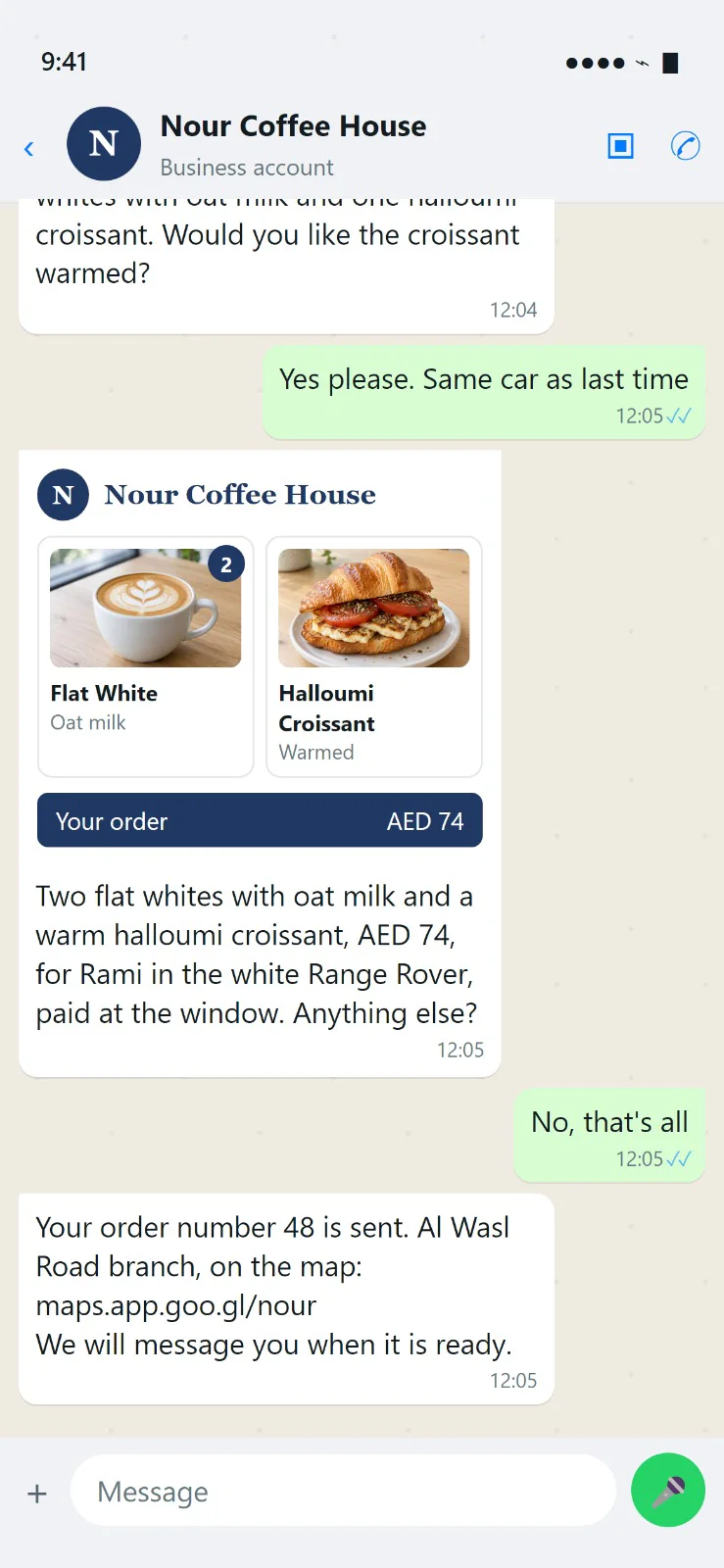
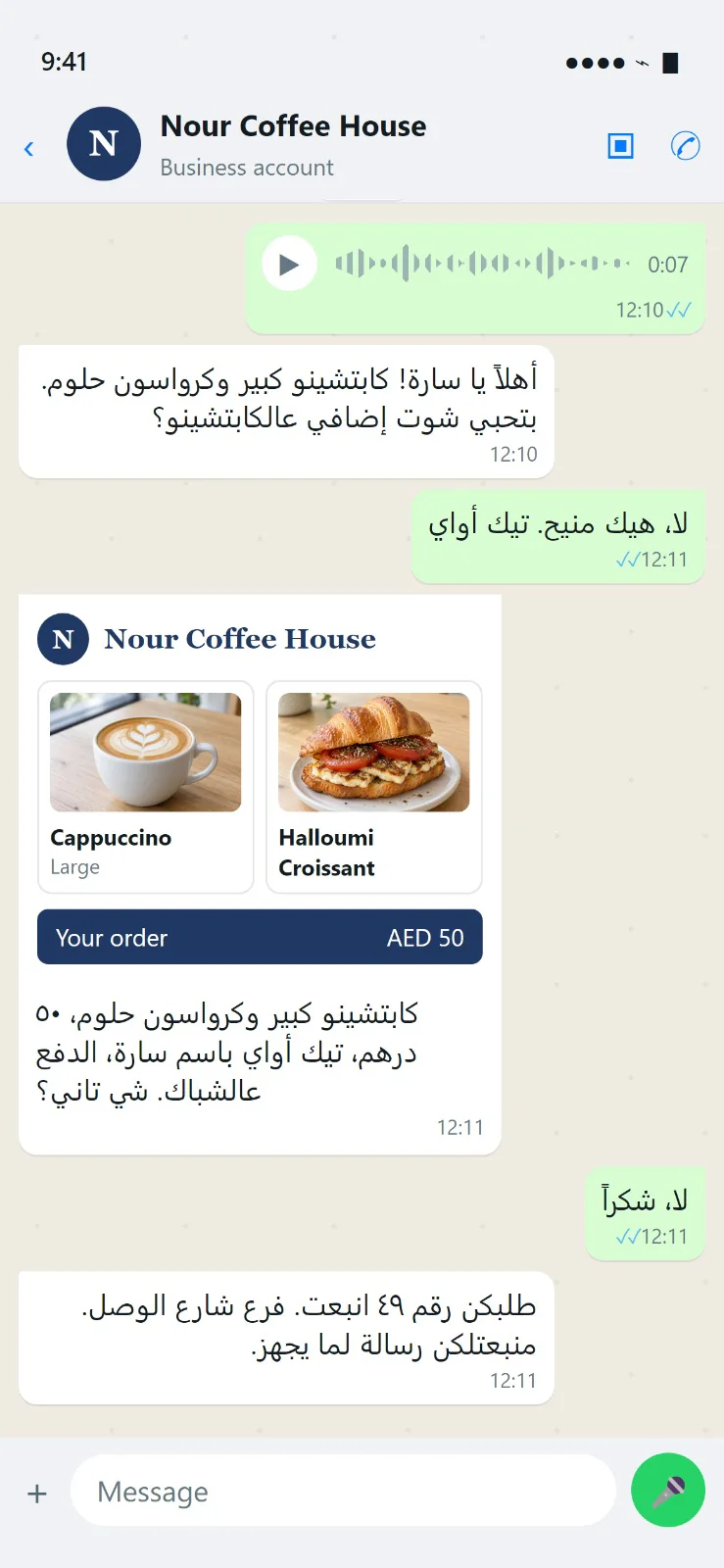
The guest's WhatsApp chat with the venue: a typed order, read back as a picture with the items, the add ons and the total, then the order sent with the branch's map link
The guest's WhatsApp chat: a voice note, answered in Arabic, the order read back as a picture, then sent
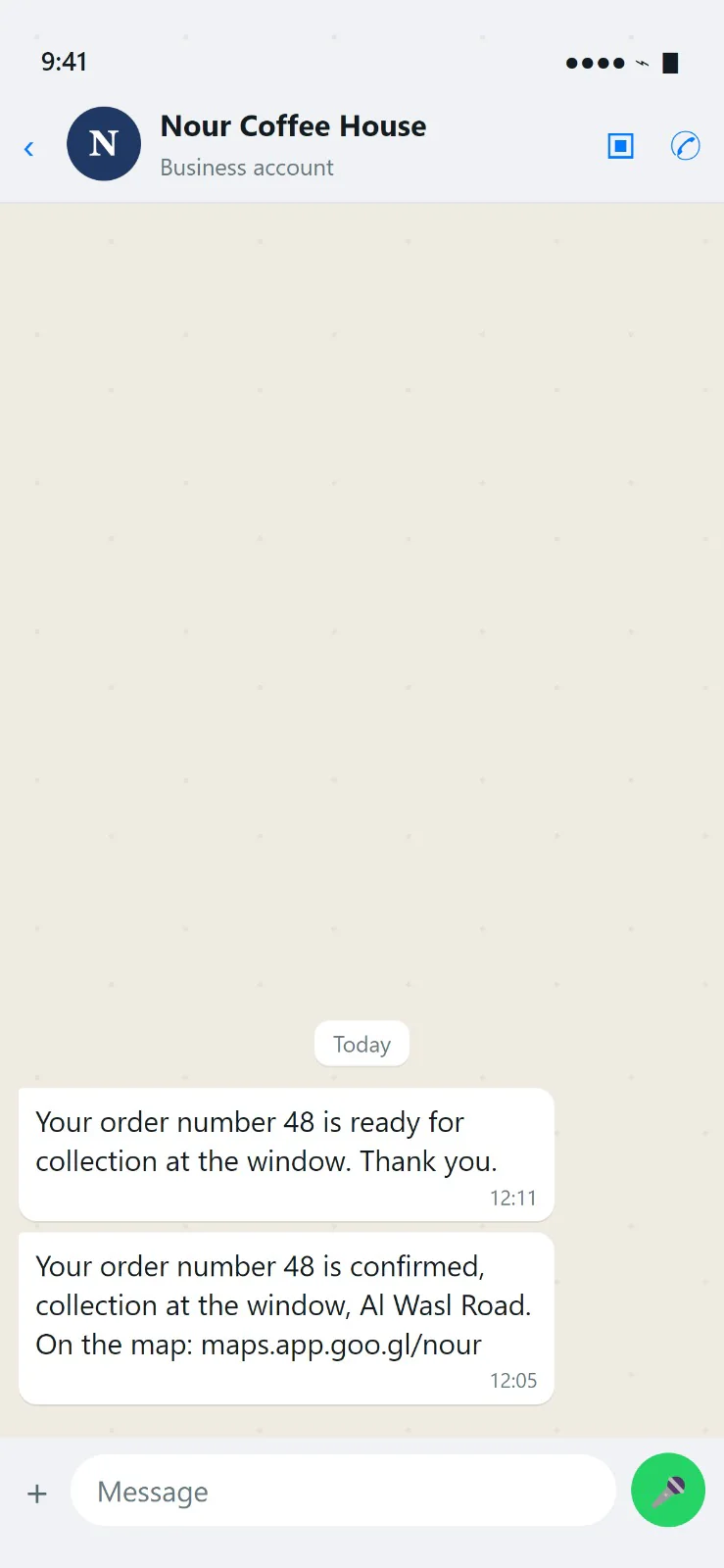
The guest's WhatsApp chat: the order confirmed with the branch's map link, then ready for collection at the window
A typed order, read back as a picture.

How it works

  1. The guest

    The guest writes or sends a voice note.

    In English, Arabic or Arabizi, typed or spoken. The ordering assistant answers in the guest's own language and asks the one thing that matters: which milk, an extra shot, which car, drive thru or take away.

  2. The guest

    The order comes back as a picture.

    The items with their photos, the quantities, the add ons and the total in the venue's colours, with the assistant's words under it: “Anything else?” A “no” sends the order.

  3. The team

    The team's phone rings.

    The order arrives on WhatsApp with Accept and Decline. A tap accepts it and the guest is told. Ready and Collected follow, each one a tap. A ticket prints on Accept.

  4. The guest

    The guest is told at every step.

    Order sent, with the branch and its map link. Accepted. Ready at the window.

  5. The guest

    A rating with one tap.

    Thirty minutes after pickup the guest rates the order, five to one, and adds a word if they like. Once a day at most.
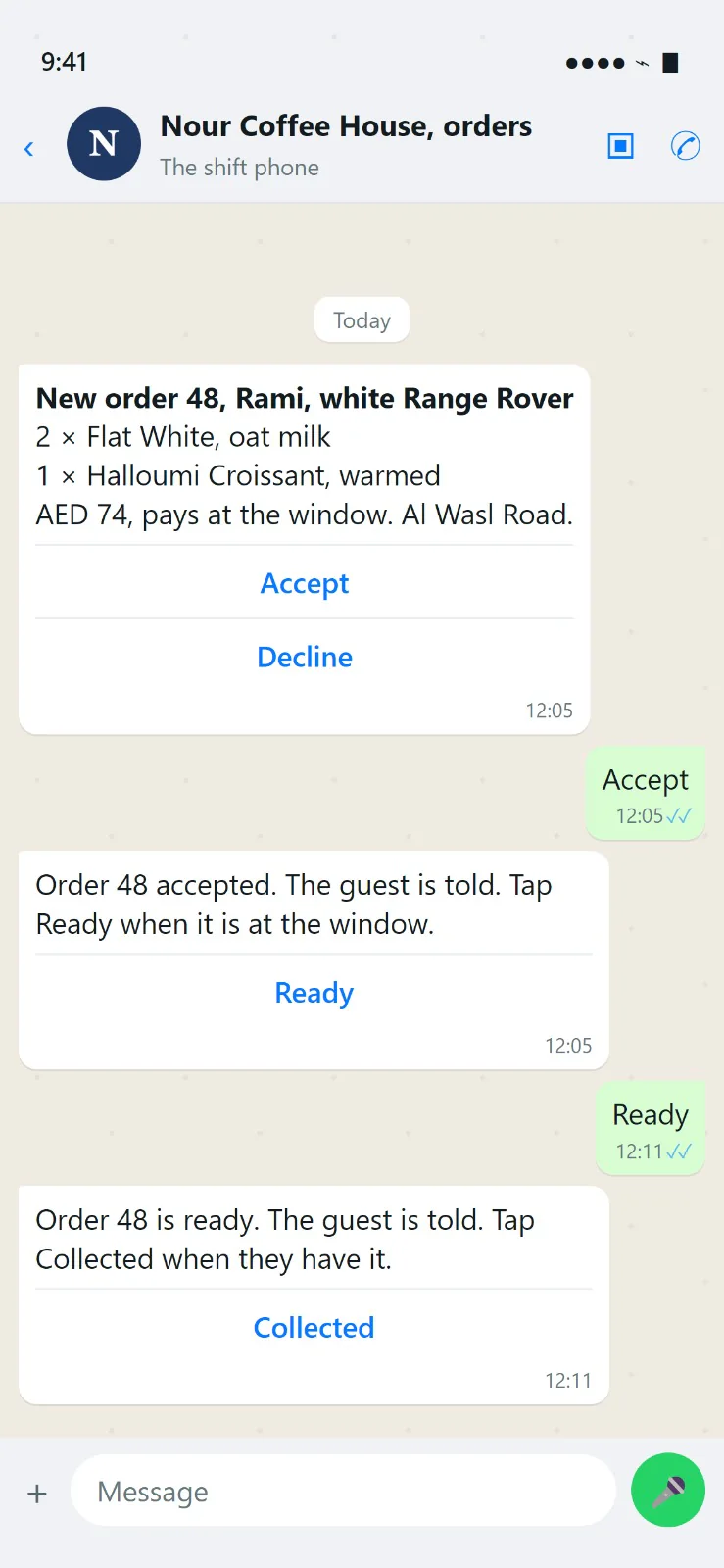
The team's shift phone on WhatsApp: a new order with Accept and Decline, then Ready and Collected, each one a tap
The shift phone: Accept, then Ready and Collected.
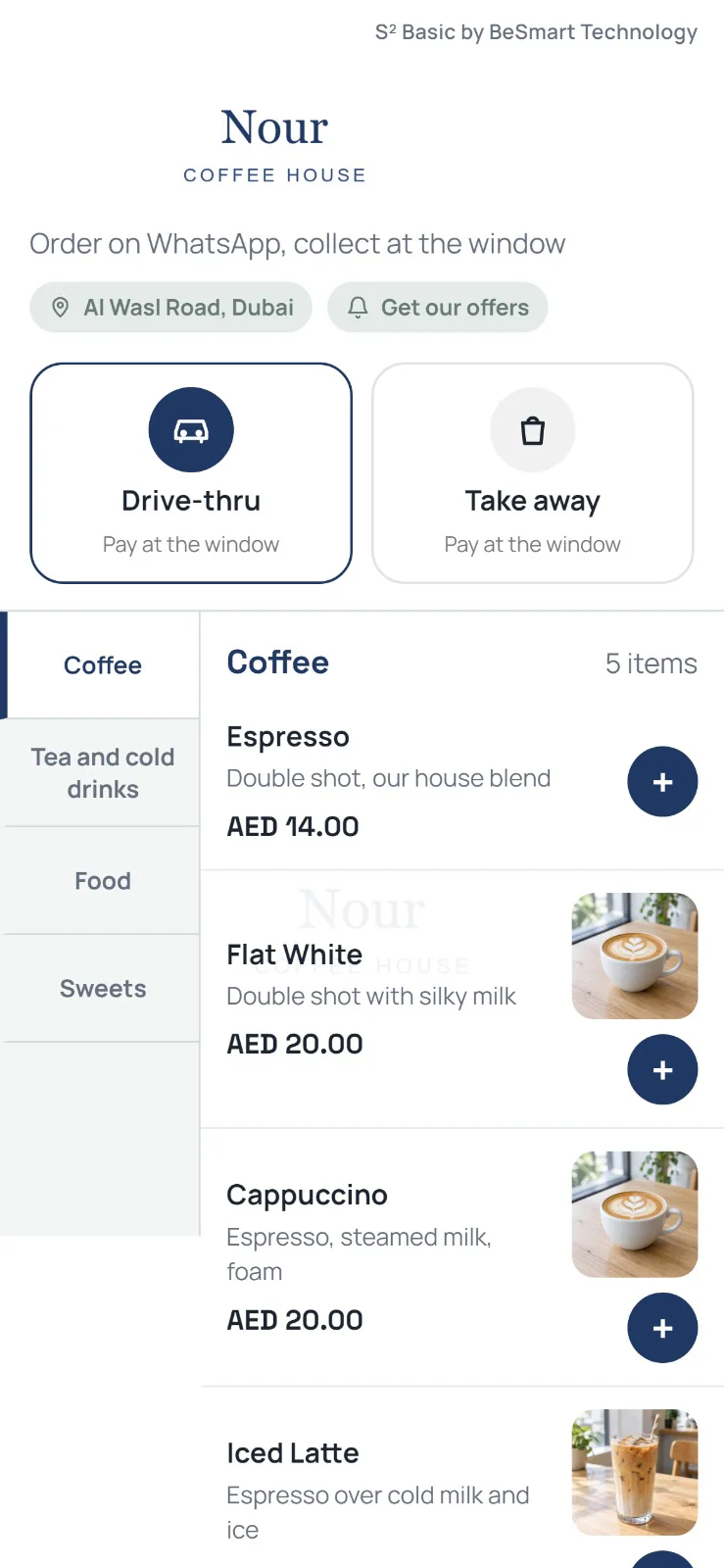
The web menu on a phone: drive thru or take away, then the menu by category with photos
The web menu, for the guests who prefer to tap.

For the guest, on WhatsApp

  • Orders by chat, in their language: English, Lebanese Arabic or Arabizi, typed or by voice note. The assistant answers in the language of the guest's last message.
  • The menu inside WhatsApp. A catalogue by category; the guest picks and sends the cart. Where there is no catalogue, the menu comes as a message.
  • Remembers the guest. “Same as last time?” and “same car as last time?” are one word away.
  • One suggestion, never twice. A brownie with the coffee, with its photo, as its own short message.
  • A person when asked. A guest who asks for a person, or complains, reaches the team. The assistant steps back until the team hands the chat back.
  • Nothing to install. The guest never leaves WhatsApp.
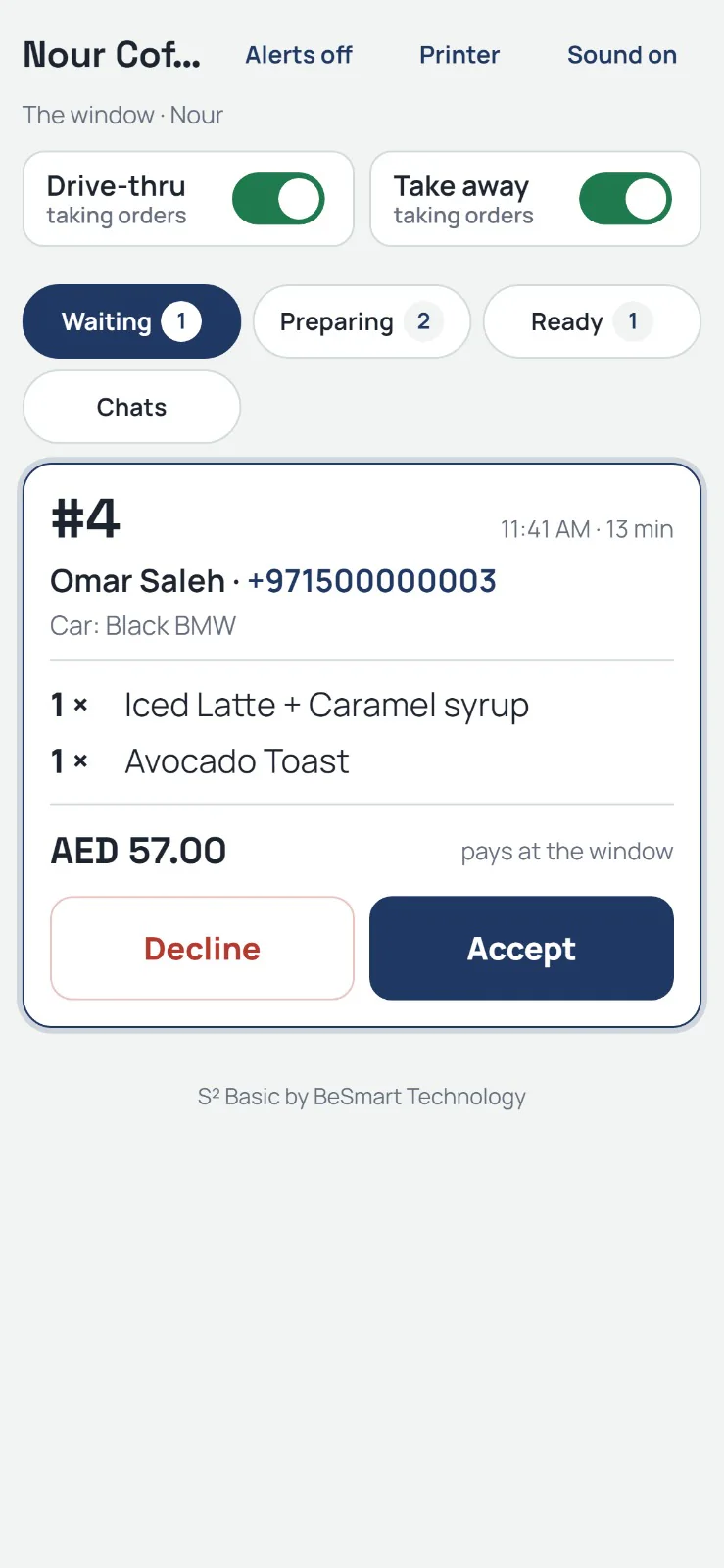
The window view on a phone: an order waiting, with Decline and Accept, and the switches for drive thru and take away
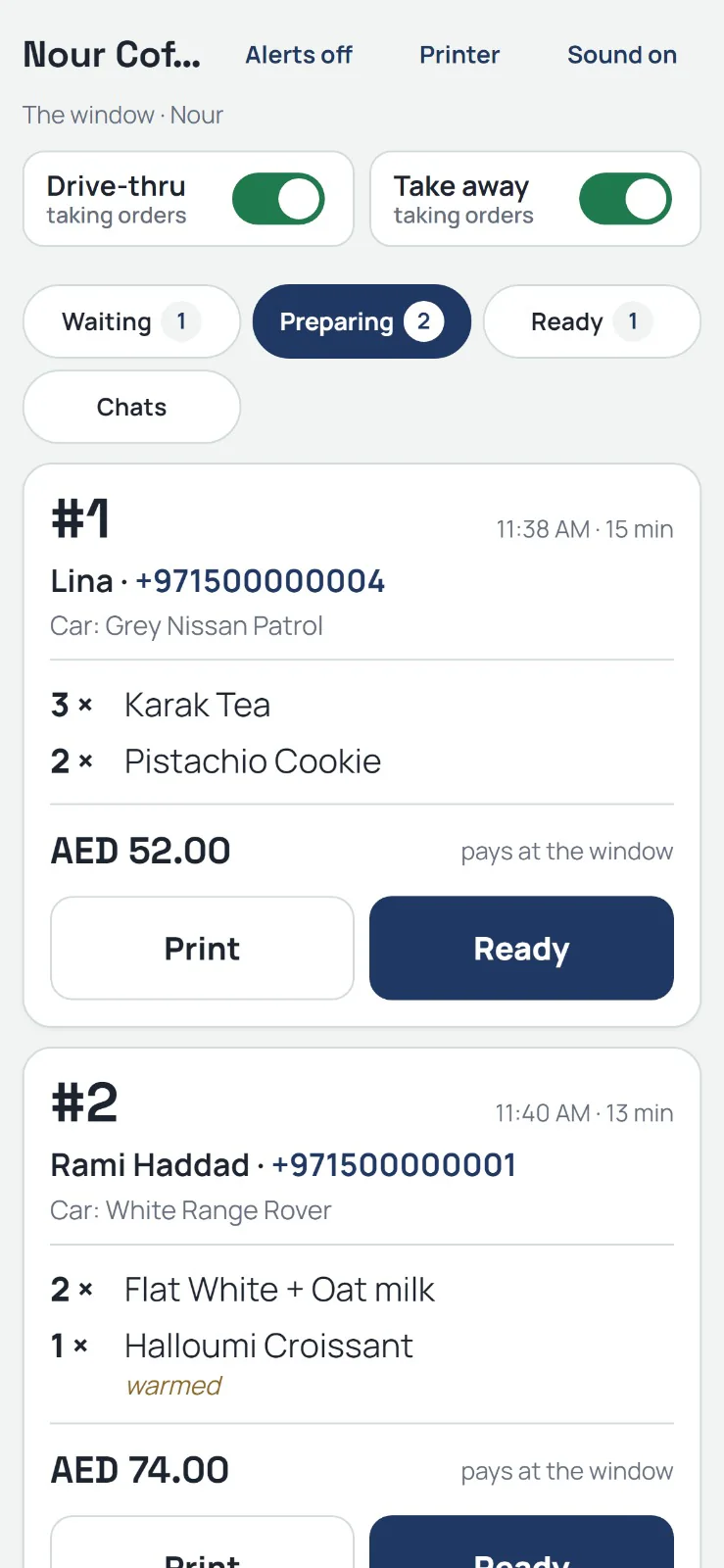
The window view on a phone: orders in preparation, each with Print and Ready
Waiting An order waiting for Accept.Preparing Orders in preparation, with Print and Ready.

For the team

  • The shift phone on WhatsApp. Every order with Accept and Decline, then Ready and Collected. A decline asks for a reason and the guest gets it.
  • The window view on any phone or computer. Waiting, Preparing, Ready, Chats. Switches for drive thru and take away. Alerts and a chime. It lives on the home screen like an app.
  • A ticket prints on Accept, on a kitchen or counter printer.
  • One number for the team, or one per branch.
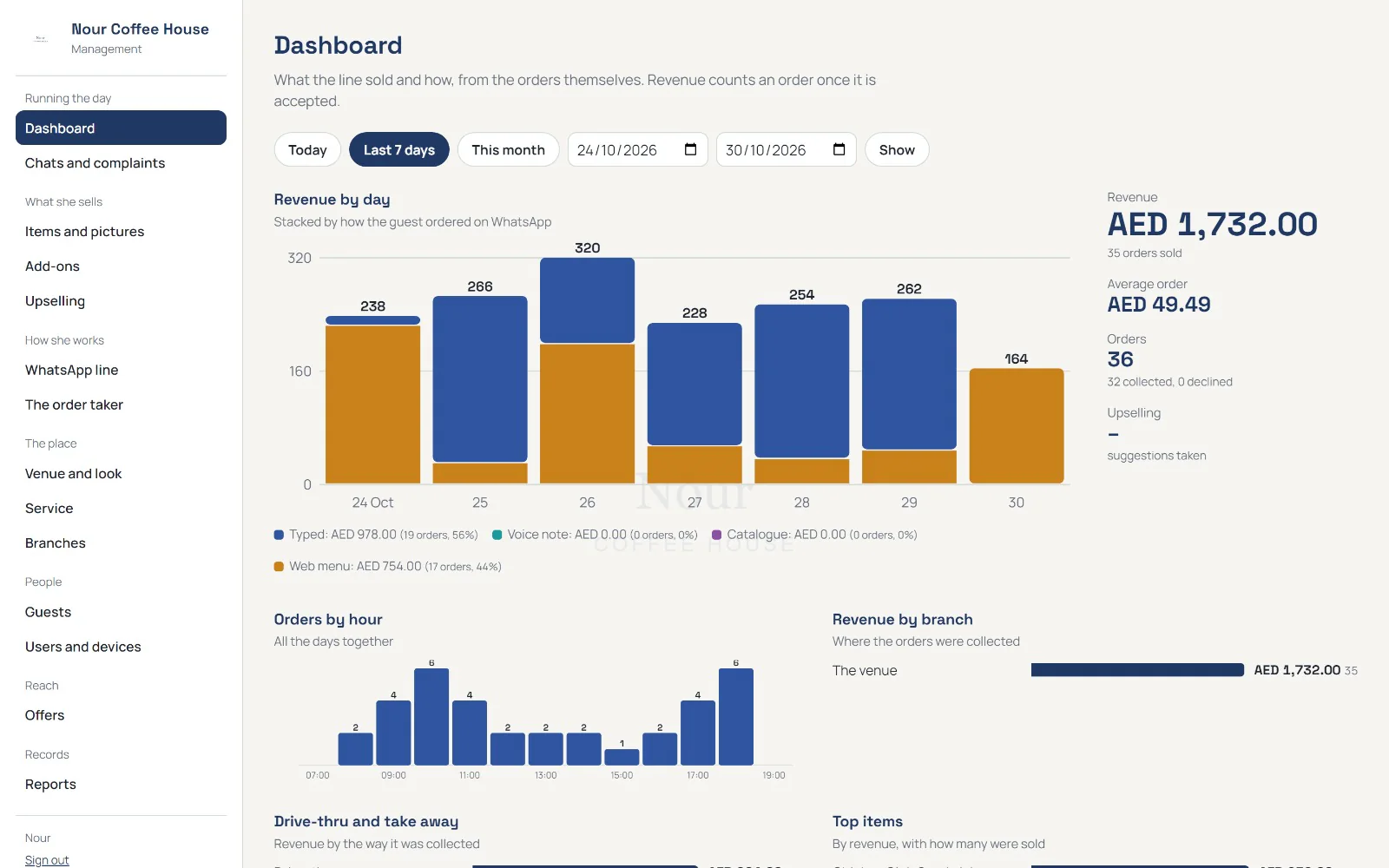
The owner's portal, the dashboard: revenue by day split by how the guest ordered, orders by hour, and revenue by branch
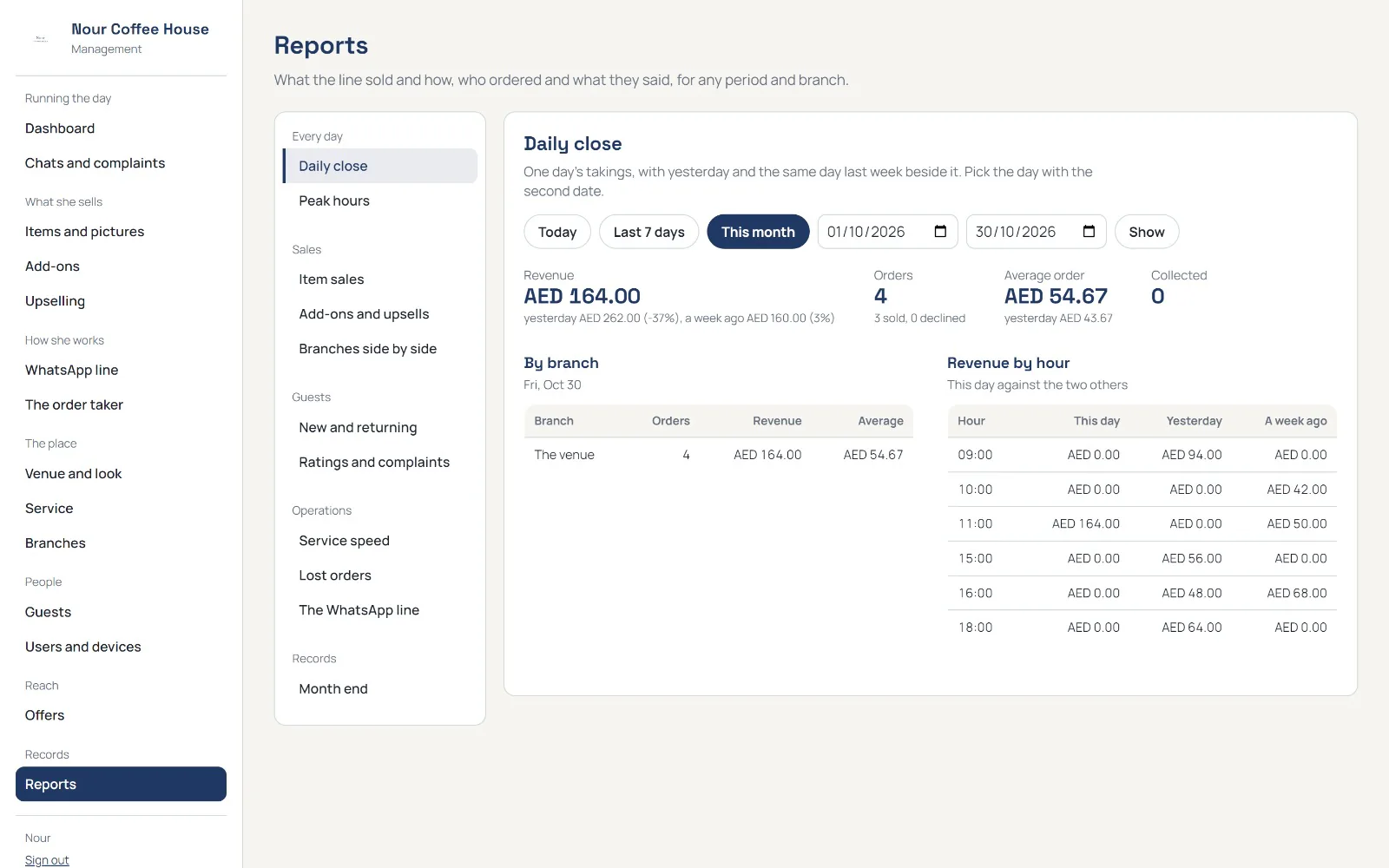
The owner's portal, the reports page: the daily close, by branch and by hour
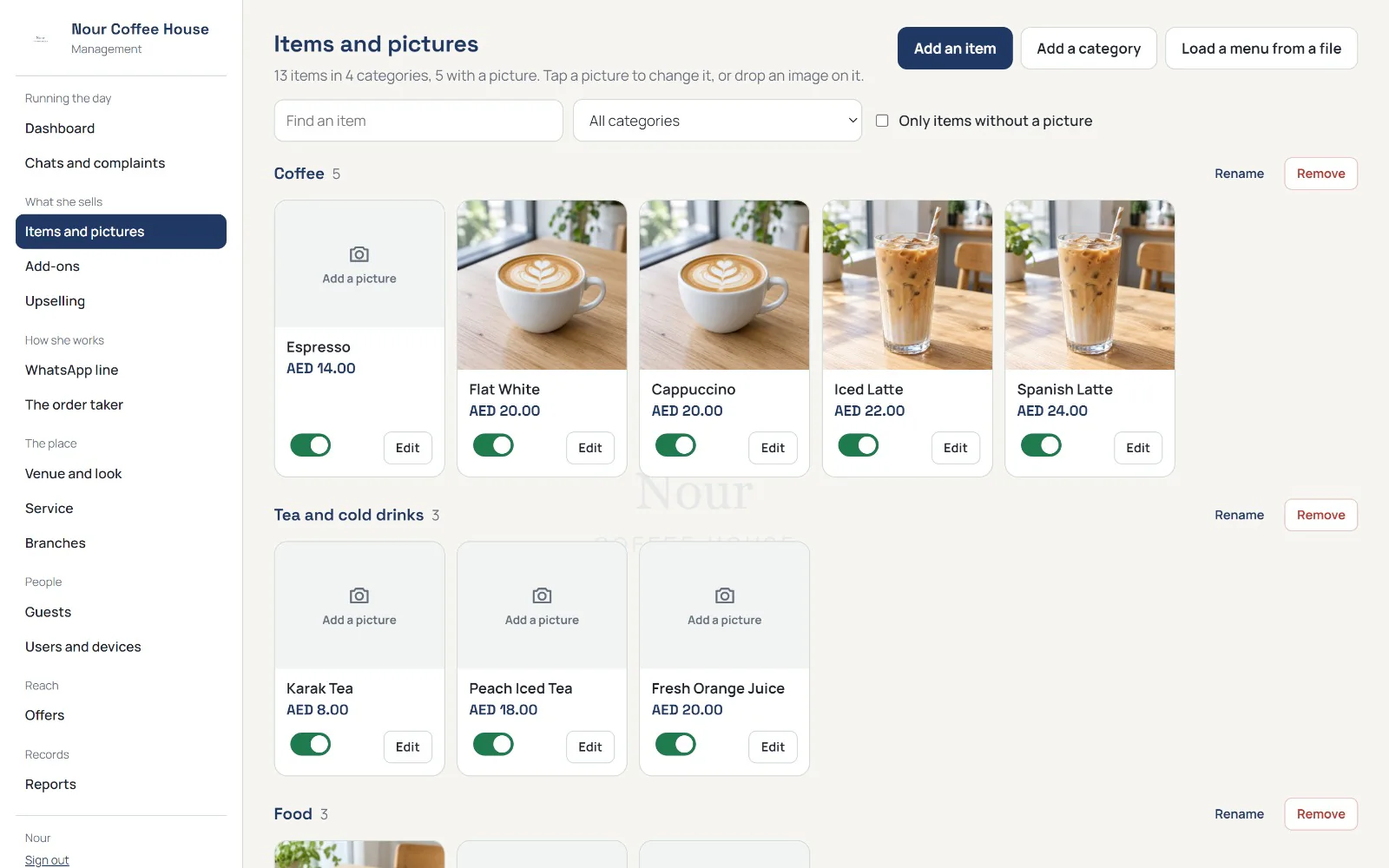
The owner's portal, items and pictures: each item with its photo and price, by category
The management portal Revenue by day, split by how the guest ordered.

For the owner, the management portal

  • Dashboard. Revenue by day, split by how the guest ordered: typed, voice note or catalogue. Orders by hour. Top items. From chat to cup: how many chats became orders. Ratings.
  • Reports for any period and any branch: daily close, peak hours, item sales, add ons and upsells, guests new and returning, lost orders, service speed, ratings and complaints, branches side by side, the WhatsApp line and its cost, month end to print.
  • Chats and complaints. Answer a waiting guest from the portal, close complaints, read the ratings in the guests' words.
  • Setup. Items and pictures, add ons, upselling pairs, the WhatsApp line, the catalogue, branches, users and devices. The venue's look: logo and colours on every page.
  • Guests, A to Z. Each guest's orders, ratings and a note. Forget a guest on request: the name and number go, the sales stay for the reports.
  • Offers. Type the offer once; it goes on WhatsApp to every guest who ever wrote to the line, in their language. A guest who writes STOP gets no more.
  • Drive thru, take away or delivery. The flow fits the venue.

  • Pays at the window, on delivery, or by the venue's own payment link.

  • Live in days. The menu loads from a file, the WhatsApp line connects, the team signs in with a PIN.

04Infrastructure

Infrastructure, built from the cable up.

Our second line of business: structured cabling, networks, WiFi, CCTV and AI cameras, access control and smart home automation for hotels, towers, retail, restaurants and homes. And we supply the hardware too.

  1. Structured cabling

    Racks, patch panels and data rooms: labelled, tested, built to be found again in ten years.

  2. Network

    One network for the whole site: switches and routers designed and configured as one, with staff, guests and devices kept apart.

  3. WiFi

    Coverage that reaches every corner, surveyed and heat-mapped before and after.

  4. CCTV and AI cameras

    IP cameras and recorders, with AI alerts for what matters: a door held open too long, a face on your watch list.

  5. Access control

    Card, PIN or phone access, with a log of every entry. Intercom and visitor management for towers and villas.

  6. Smart home automation

    Lighting, climate, blinds, audio, cameras and the door on one panel and one phone. You leave, and it locks up behind you.

  7. Hardware supply

    Servers, workstations, screens, network gear and cameras, supplied as a partner of HP, Dell, Belden and Lenovo and configured before they ship.

    Partners and supplyHPDellBeldenLenovo

Every cable labelled and tested

Designed, supplied, installed and maintained by one team

Smart home automationAny house can hold devices. A home is when they agree.The blinds close before the sun turns, the air is right before you walk in, and the cabling is the part nobody ever has to see.Film0:30

05Book a demo

See it on your own menu.

A demo on your menu and tables.

We call back within one working day.

  • Running in a week.A first outlet usually runs within a week.
  • Start with the till.Then guest pages and bookings, when the team is comfortable.
Book a demo
I'm interested in
What would you like to see? Choose all that apply

We only use these details to reply to you.